
DIY Ambilight with Raspberry Pi
Ever wanted to add dynamic RGB backlighting to your TV that changes color to match what's on screen? Here's how to build your own Ambilight clone using affordable components.
What You Need
- Raspberry Pi 2 (or newer) running XBMC/Kodi (OpenElec)
- Arduino Nano — drives the WS2812b LEDs (Raspberry Pi can't reliably control them directly)
- WS2812b RGB LED strip — individually addressable LEDs
- 5V power supply — 3-5 amps depending on LED count
- Hyperion — open-source ambient lighting software
Why Arduino?
WS2812b diodes require an 800kHz signal with precise timing. Raspberry Pi doesn't run a real-time OS, so any kernel interrupt breaks the signal and causes flickering. The Arduino Nano handles the timing-critical LED control while the Pi handles video analysis.
How It Works
- Hyperion runs on the Raspberry Pi alongside Kodi
- It captures the edges of each video frame in real-time
- Calculates the average color for each LED position
- Sends color data to the Arduino via serial (USB)
- Arduino drives the WS2812b strip at 800kHz
The result: your LED strip mirrors the colors on screen, creating an immersive backlight effect that extends the picture beyond the TV edges.
Setup
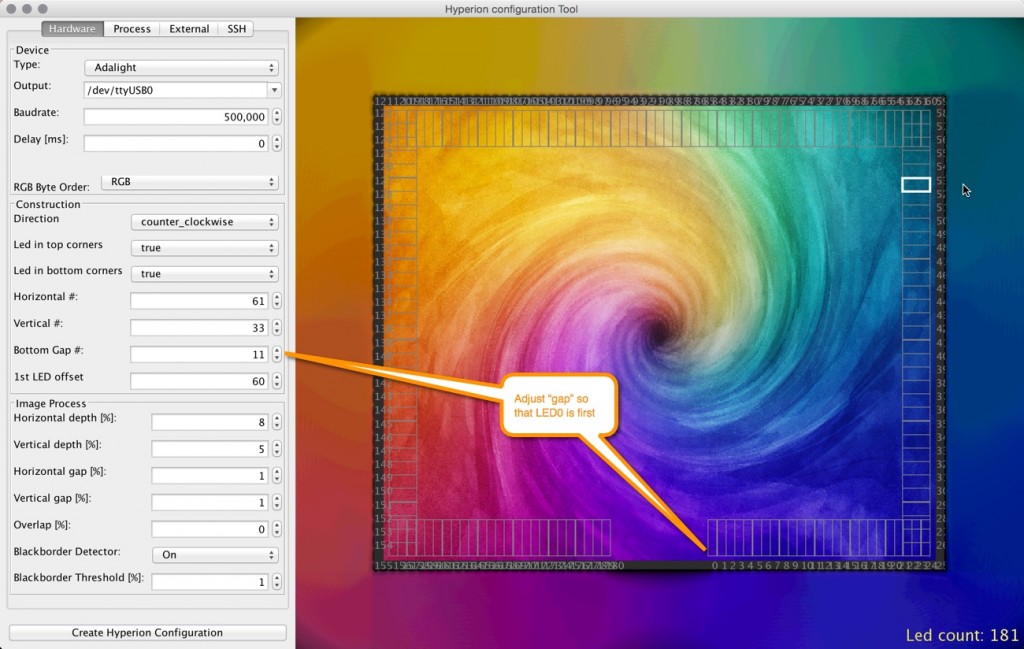
The Hyperion configuration tool lets you define your LED layout — how many LEDs on each side of the TV, the direction, and the offset. It generates the configuration file that maps screen regions to LED positions.
Power consumption maxes out at 3-5 amps when all LEDs are fully white. In practice, during normal video playback, it draws much less.
Remote Control
Hyperion supports a mobile app for remote control — you can set static colors, enable effects, or switch to live video mode. It also integrates with Kodi's playback state, so the lights can automatically dim when you pause.
The Maker Spirit
Projects like this — combining a Raspberry Pi, an Arduino, some LEDs, and open-source software — are what makes the maker community great. You take commodity hardware, write some code, and build something that commercial products charge hundreds of euros for.
This same hands-on approach is exactly what we apply to AI today. Instead of paying for expensive black-box AI services, we take open-source models, customize them for specific use cases, and deploy them on dedicated hardware.
This article is from the ai.rs archive (originally published on the old ai.rs tech blog). Today, ai.rs builds custom AI assistants for businesses.
Explore what we do now:
- What Is AI, Really? — Start here if you're new to AI
- What is an LLM and How to Deploy It — Technical deep-dive for developers
- Your AI Sales Associate That Never Sleeps — See how AI works for business
- How It Works — Our custom AI service, from your data to a live assistant